Read PDFs. Understand them.
With an AI assistant that knows the page.
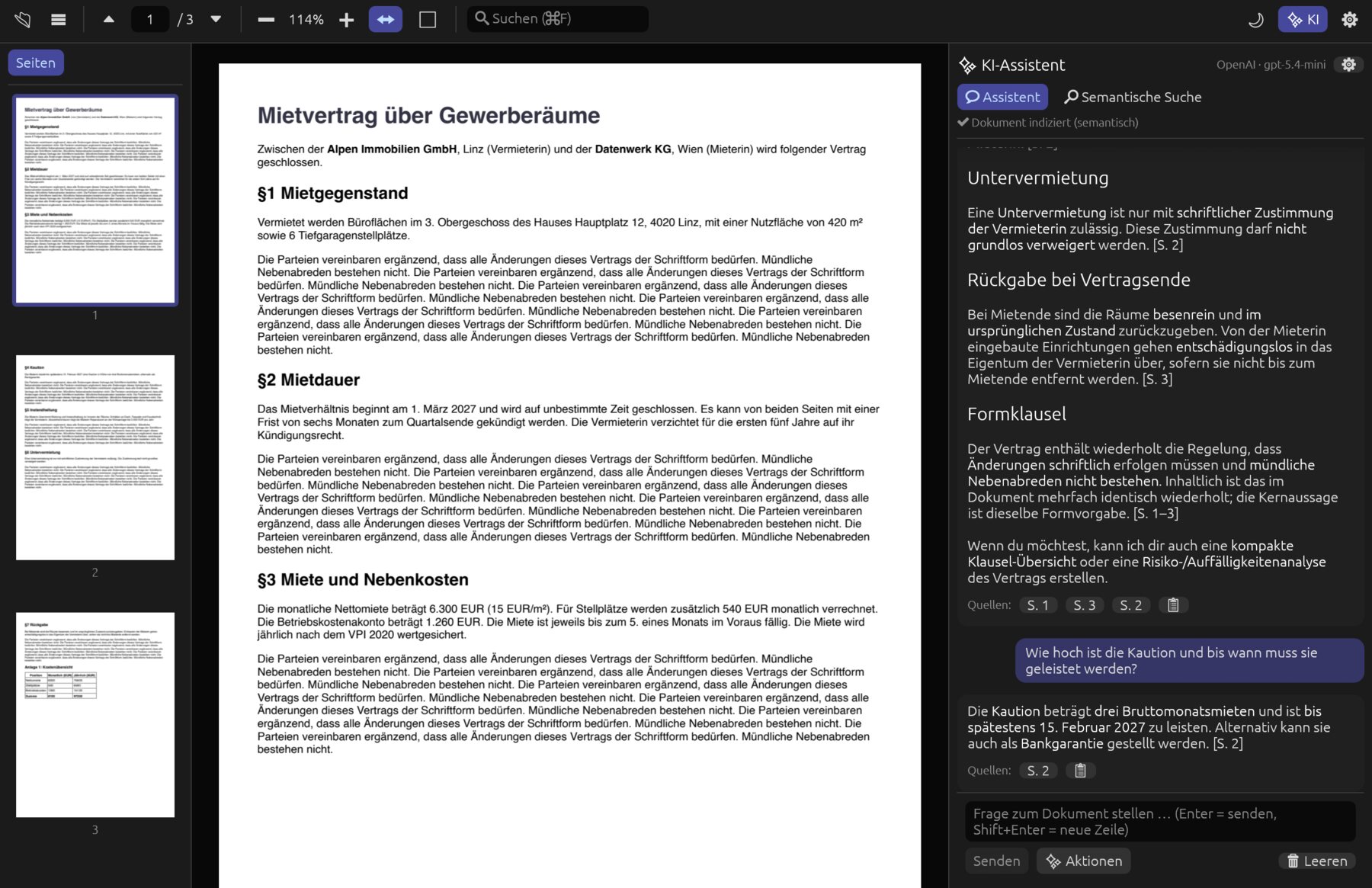
Pagelier is a fast PDF viewer and editor with a built-in assistant: it answers questions with page references, finds passages by meaning, summarises, reviews critically and translates – with OpenAI or fully offline on your computer. On top of that you edit, redact, sign and compare PDFs as in a full editor.
summarise, review, deadlines, tables, translate
OpenAI, built-in local models or your own server
so Claude can read and control the document
macOS, Windows and Linux, Intel & ARM
Ask your document.
And see where it says so.
Every answer names the pages it is based on – one click takes you there. Instead of words only, Pagelier also searches by meaning: “termination” also finds “ending the contract”.
The essentials, with sources
- Summary and key points
- Outline of the document
- Glossary of technical terms
- Flashcards and a quiz on the content
- Translate a page, choose the answer language
What is easy to miss
- Critical review: contradictions, risks, unfavourable clauses
- Deadlines and to-dos with dates and amounts
- Analyse a page: charts, formulas, scanned pages
- Tables on a page as CSV
Right where the text is
- Explain the selected text
- Translate and simplify
- Summarise or ask about it
- Copy the result or keep asking
With OpenAI, Pagelier uses your own API key; the document only leaves your computer when you ask a question or start an action. With the local models (Qwen3.5 and Multilingual-E5, downloaded once) everything stays on your computer – on the Mac with Metal acceleration. Any OpenAI-compatible server such as Ollama or LM Studio works too.
A PDF viewer that is a good viewer first
Pagelier is written in Rust and renders with PDFium, the PDF engine of Chrome – only visible pages, neighbouring pages ahead of time. Even a thick manual stays smooth.
Read
Continuous scrolling, cleanly rendered.
- Fit width or whole page
- Zoom from 10 to 800 %, with the wheel or a pinch
- Thumbnails and table of contents
- Dark reading mode for the pages too
Search
By words and by meaning.
- Full-text search with hit list, match case and whole words
- Text recognition (OCR) makes scans searchable
- Hybrid semantic search (embeddings + BM25)
- Accents and special characters handled correctly
- Hits jump straight to the passage
Mark up & edit
Right in the PDF, with undo.
- Change, move and replace existing text and images – the rest of the line moves along
- Text, shapes, pen, stamps and images on the page
- Highlights, notes with replies and status
- Fill in forms and create your own
- Draw your signature and place it
Protect & sign
For contracts, records and agencies.
- True redaction – the AI suggests personal data, you check each area
- Password protection with AES-256 and permissions
- Digital signatures with a certificate, signature checks
- Headers, footers, page numbers, watermarks
Convert & check
In, out and double-checked.
- Export as a Word document or images
- Images and Office files to PDF
- Compare two versions, with an AI summary
- Check accessibility, PDF/A and print readiness
Private
Your documents stay yours.
- Local models without internet – search by meaning then stays on your computer too
- API key stored only locally
- No usage data, no account
- Password-protected PDFs
Convenient
Small things that make the day easier.
- Several documents in tabs
- Reorder, rotate, delete and crop pages, merge PDFs (form fields stay fillable) and split them
- Add bookmarks, reduce file size
- Two-page view, presentation mode, read aloud
- Printing, export as image or text
Reliable
Even with broken files.
- 179 automated tests, edge cases included
- Damaged PDFs are rejected cleanly
- A file that fails to open leaves the open document alone
Let Claude read along
Pagelier is an MCP server. Claude Desktop and Claude Code open PDFs, read text, look at pages as images, search, turn pages, highlight passages and use the built-in assistant – live in the window.
- In the open window – you see what Claude does and can step in at any time
- One click to set up – Settings › Control by Claude: copy the command or add it to Claude Desktop
- Only on your computer – local endpoint with an access token, can be switched off
open_documentget_page_textrender_pagesearch_textsemantic_searchgo_to_pageselect_textset_viewask_assistantrun_assistant_actionget_outlineget_statuslist_recent_documentsDownload Pagelier
Current version of – for macOS, Windows and Linux.
New in this version:
How everything works is explained in the documentation – with step-by-step guides and screenshots. For a quick overview, watch the explainer videos.
PDFium is included in every package. Licences of the included components: THIRD-PARTY-NOTICES.txt in every package.
Good to know
What does Pagelier cost?
Nothing. Pagelier is free, with no subscription. If you use the assistant with OpenAI, you need your own API key and pay OpenAI for what you use – the local models cost nothing.
Does the AI assistant work without internet?
Yes. In the settings you download a local model (Qwen3.5 0.8B, 2B or 4B) and Multilingual-E5 for semantic search once; after that Pagelier works fully offline. If the chat runs locally or on your own server, no text goes to OpenAI for semantic search either. Without a model or key, the viewer and keyword search work as usual.
What happens to my documents?
They stay on your computer. Only when you ask a question or start an action with OpenAI or your own server are the passages needed for it (for “analyse page” an image of the page) sent to that provider. We receive no data.
Can I use Ollama or LM Studio?
Yes: Settings › AI provider › Own server. Any OpenAI-compatible endpoint works, such as Ollama, LM Studio or vLLM.
Will my system warn me on first launch?
Not on the Mac: Pagelier is notarised by Apple. On Windows, SmartScreen may ask on first launch: “More info” › “Run anyway”.
How do I connect Claude?
Under Settings › Control by Claude (MCP) you find the command for Claude Code ready to copy, and a button adds Pagelier to Claude Desktop. Then restart Claude Desktop.
Where can I find a manual?
In the documentation: it explains every feature of Pagelier with step-by-step guides and screenshots, and it is searchable.
What language is the interface in?
The interface is in German for now. The assistant answers in the language you choose in the settings, English included.
Ready for your next PDF?
Download Pagelier and ask your document whatever you want to know.